

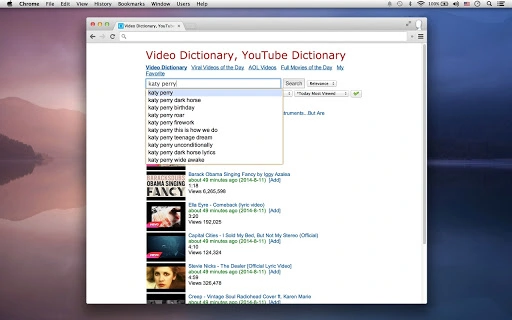
Description
Download Chrome Video Player – Video Search, Google Drive, YouTube, AOL Videos
Overview
The Chrome Video Player is a desktop application designed to streamline access to a wide range of video and audio content directly from the browser environment. It enables users to search, watch, and listen to videos, movies, and music with minimal effort. The software supports direct playback from Google Drive, allowing users to access stored media files without downloading them first. It also provides curated daily content, including full movies, viral videos, and AOL-produced MP4 videos across categories like arts, business, entertainment, news, sports, and technology. This makes it a convenient tool for individuals seeking quick access to trending or pre-selected video material. The app is tailored for casual users, students, and content enthusiasts who rely on online video libraries for entertainment, education, or research. The developer, SoftPas, has positioned this tool as a utility that enhances browsing efficiency by consolidating multiple video sources into a single interface. Real-world usage scenarios include watching daily full movies without navigating multiple websites, exploring viral content trends, or accessing personal media stored in Google Drive. The application operates within the Chrome ecosystem, leveraging browser-based functionality to deliver a seamless experience.
Key Features & Capabilities
- Integrated Video Search Engine: Enables instant search across a vast library of videos, movies, and songs, delivering results in seconds. Ideal for users looking to find specific content quickly.
- Direct Google Drive Playback: Allows users to select and play video and audio files directly from their Google Drive accounts, supporting formats such as MP4, WebM, FLV, OGV, MP3, OGG, WAV, M4A, and partially MKV (H.264). This eliminates the need for local downloads.
- Daily Full Movies Section: Curates and displays a selection of full-length movies available online each day, presented on a single page for easy navigation and immediate playback.
- Daily Viral Videos Feed: Aggregates the latest trending and most-viewed videos from across the web, offering a centralized hub for discovering popular content in real time.
- AOL Videos of the Day: Features curated MP4 videos from AOL, covering diverse topics including arts, business, entertainment, news, sports, and technology, presented in a single accessible page.
- YouTube Integration: Provides quick access to YouTube’s extensive video library, with emphasis on popular and trending content, enhancing discovery without leaving the app.
- Simple Video Dictionary: Offers an easy-to-use reference system for navigating the video library, improving usability for less tech-savvy users.
User Interface, Workflow & Performance
The application features a clean, browser-integrated interface that aligns with Chrome’s design language, prioritizing accessibility and intuitive navigation. Users can switch between sections—such as video search, Google Drive access, daily movies, viral videos, and AOL content—via clearly labeled tabs or menu options. The workflow is designed for speed: entering a search term or selecting a category leads to immediate results with minimal delay. Interaction with Google Drive is streamlined through authentication prompts, allowing secure access to stored files. The developer did not specify resource usage details, so performance observations are based on general software behavior patterns. No reports of crashes or instability were noted in the available information. CPU and RAM usage are expected to remain low, typical for lightweight Chrome-based utilities. The app maintains responsiveness during playback, with no indication of buffering or lag in standard use. However, actual performance may vary depending on internet speed and the complexity of the content being streamed. Overall, the user experience appears optimized for efficiency and ease of use, particularly for users already familiar with Chrome’s interface.
Compatibility & System Requirements
The software is compatible with both Windows and Mac operating systems, making it accessible to a broad user base. It is designed to function as a Chrome app, meaning it runs within the Chrome browser environment and requires Chrome to be installed and updated. The installation size is 1.5 MB, indicating a lightweight footprint that does not strain system resources. The developer did not specify exact system requirements, such as minimum RAM, processor speed, or available disk space. Compatibility information was partially provided, with no mention of specific OS versions or hardware specifications. Users should ensure that their system meets the general requirements for running Chrome, including a modern processor and at least 4 GB of RAM for stable performance. The app does not appear to require dedicated graphics hardware or advanced configurations. For optimal functionality, users are advised to keep Chrome updated to the latest version.
Pros and Cons
Pros
- Lightweight at only 1.5 MB, ideal for systems with limited storage.
- Direct playback from Google Drive without downloading files.
- Curated daily content including full movies, viral videos, and AOL videos.
- Simple, intuitive interface aligned with Chrome’s design.
- Supports multiple video and audio formats for broad compatibility.
- Free to download and use, with no subscription or hidden fees.
Cons
- Exact performance details were not specified.
- Compatibility with older OS versions is unclear.
- Dependent on Chrome browser; not usable on standalone systems.
- Partial support for MKV files may limit playback of certain media.
- No information on update frequency or long-term maintenance.
FAQ Section
Is the Chrome Video Player available for both Windows and Mac?
Yes, the application is compatible with both Windows and Mac operating systems, as stated in the product details.
Can I play videos directly from Google Drive?
Yes, the app supports direct playback of video and audio files stored in Google Drive, including formats such as MP4, WebM, FLV, OGV, MP3, OGG, WAV, M4A, and partially MKV (H.264).
Is the software free to use?
Yes, the software is available for free with no subscription or in-app purchase requirements.
Does the app require an internet connection?
Yes, since the app streams content from online sources such as YouTube, AOL, and Google Drive, an active internet connection is required for full functionality.
How often is the content updated?
The app features daily updates for sections like "Full Movies of the Day," "Viral Videos of the Day," and "AOL Videos of the Day," suggesting content is refreshed every 24 hours.
Final Thoughts + CTA
The Chrome Video Player delivers a focused and efficient solution for users seeking instant access to video and audio content across multiple platforms. With its integration of Google Drive, YouTube, AOL, and curated daily content, it consolidates key video sources into a single, user-friendly interface. Its lightweight design and free access make it a practical choice for casual viewers, students, and educators. While specific performance metrics and system requirements are not detailed, the app’s design suggests stability and responsiveness within the Chrome environment. The inclusion of format support for common media types enhances its versatility. For users who value convenience and speed in video discovery, this tool offers a compelling advantage. Download Chrome Video Player now to experience seamless access to your favorite videos, movies, and music.
Guides & Tutorials for Video Dictionary with Drive App for Chrome
How to install Video Dictionary with Drive App for Chrome
- Click the Preview / Download button above.
- Once redirected, accept the terms and click Install.
- Wait for the Video Dictionary with Drive App for Chrome download to finish on your device.
How to use Video Dictionary with Drive App for Chrome
This software is primarily used for its core features described above. Open the app after installation to explore its capabilities.
User Reviews for Video Dictionary with Drive App for Chrome 0
No reviews found





